Biocloud
Welcome to the documentation for the Biocloud codebase!
Data Architecture
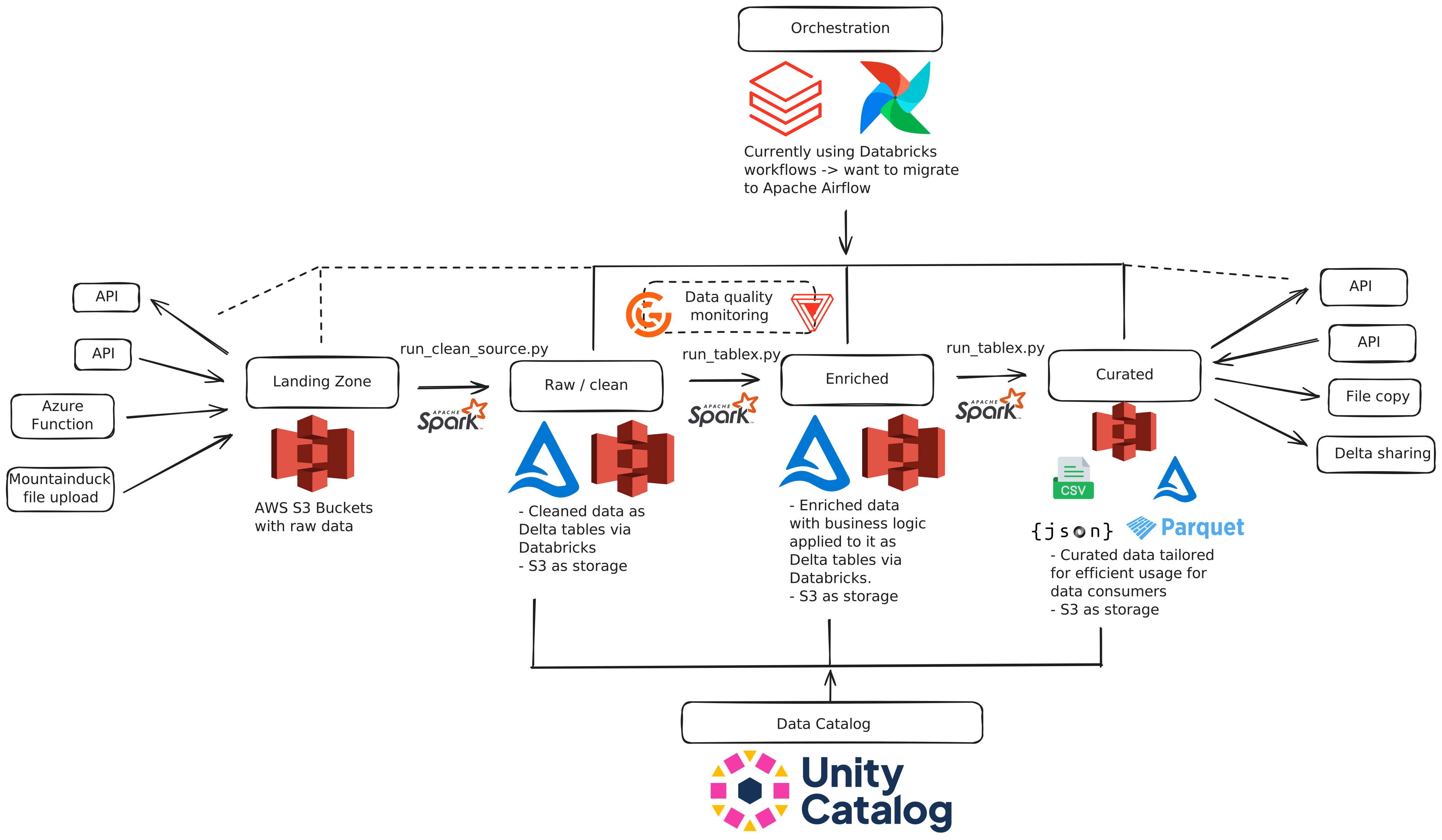
Codebase Overview
Our codebase mirrors our data architecture — think of it as a Digital Twin!
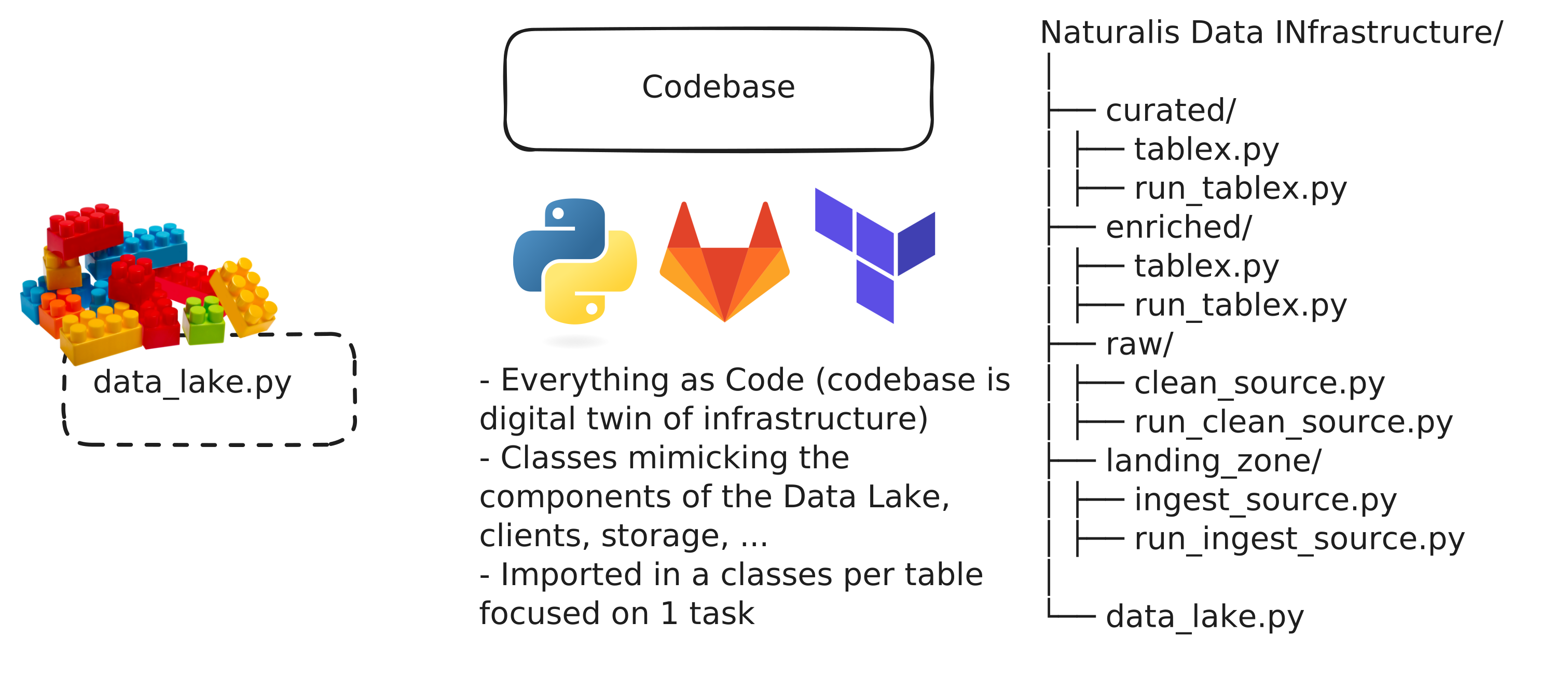
Dependencies in the codebase
Setup your local environment
Within the root directory of the codebase (biocloud-core), run pre-commit install --hook-type post-checkout --hook-type post-merge in the terminal. This command makes sure the pre-commit hooks (defined in .pre-commit-config.yaml) needed to check
if your local environment is synced are executed
when the pyproject.toml file is saved on disk and whenever post-checkout/pull operations are performed.
UV
What's UV?
UV is a modern Python package manager from Astral that replaces pip, virtualenv, and pip-tools with a single fast,
reliable tool. It manages dependencies through a pyproject.toml + uv.lock pair, ensuring exact reproducibility
across machines, CI, and Docker.
Why UV?
UV is written in Rust, meaning that dependencies installs and lockfile updates are dramatically faster than traditional
by several orders of magnitude (uv:0.1s vs pip:5s on average) if compared to more traditional resolvers.
UV also enforces clarity and consistency: pyproject.toml declares what you want, while uv.lock pins the exact
version of what you got,
and uv sync guarantees your environment matches the lock. This means a cleaner dependency management, a seamless
integration with tools like Poetry,
modern Python packaging standards, and a more science-oriented approach as the exact pinning lock guarantees
reproducibility with a deterministic logic.
Install uv on local
On your local terminal in PyCharm/VS run:
curl -LsSf https://astral.sh/uv/install.sh | sh
How does the uv package manager work:
1) make/update the lock (only when dependencies change)
uv lock
2) install the lock dependencies into the local environment
uv sync
3) optional: if you also want optional/special dependencies e.g. the Databricks group in your local env:
uv sync --extra databricks
These dependencies are defined with a dedicated section in the pyproject.toml.
Installation of pyproject.toml-uv.lock mismatch warning on PyCharm:
Use the File Watchers (File -> Settings -> Tools -> File Watchers) functionality to warn when your change in the dependencies does not reflect what you have in your own environment. This check also warns whether a change in dependencies does not resolve in terms of inter-packages compatibility.
Settings for the File Watchers:
Name: uv lock check
File type: TOML
Scope: current file (apply these settings while having the pyproject.toml open)
Program: /home/
Now every time you save the pyproject.toml (usually it does automatically in PyCharm), PyCharm runs
uv lock --locked.
If the lock is stale you will see the error in the Run panel, if not the warning message will be displayed anyway and
exits with code 0.
Airflow Data Orchestration
Here below we illustrate how our current Airflow orchestration pipeline works, from our Biocloud codebase to Databricks jobs.
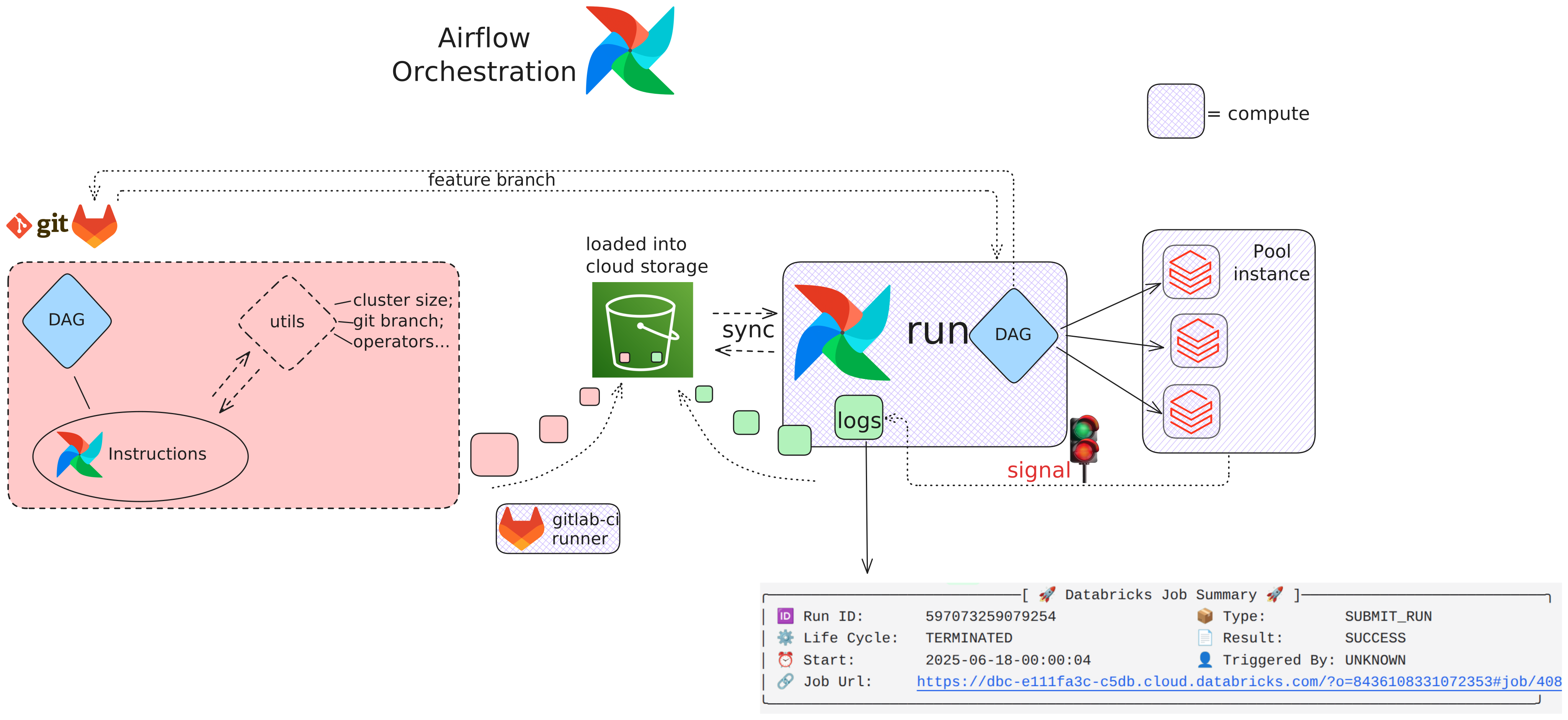 Current flow:
1) The Airflow DAGs and their utilities (python libraries & yml configurations etc) are edited in Gitlab. Once pushed to
a
remote branch, the deploy_dags_<env> stage of the gitlab-ci.yml -if triggered in the Gitlab runner- loads the DAGs
and the utils
to an S3 bucket in AWS.
2) The Airflow compute constantly syncs with the S3 bucket to keep DAGs and utils updated. Based on the DAGs configurations, Airflow submits specific tasks to the Databricks Pool Instance, instructing Databricks to use the codebase repository and the same feature branch of the commits for the jobs.
3) Finally, the Databricks computes available in the pool run the actual codebase scripts and signal eventual success/failure of each Airflow task. The logs of the runs are kept in the Airflow database as well as the same S3 bucket as the DAGs.
Useful links
Demonstrating Mermaid
graph LR
  A[Start] --> B{Error?};
  B -->|Yes| C[Hmm...];
  C --> D[Debug];
  D --> B;
  B ---->|No| E[Yay!];
DSI Team Documentation
Shipping data from DSI to Biocloud
The DSI team is responsible for preparing and exporting raw datasets for the biocloud team. Prior to export, the DSI team manipulates the data and ensures it follows a predefined schema. This schema is designed to preserve complex nested relationships while preventing compatibility issues during export. The datasets are saved in Parquet format, with several fields stored as Struct types to maintain nested structures. This allows for consistent ingestion downstream while minimizing the risk of schema mismatches or nullability conflicts.
Once processed, the datasets are delivered to an S3 bucket in the following structure,
where datetime follows the format yyyy-mm-dd-HH:MM:SS as it's done for Nanopore:
bucket://dsi/datetime/
  ├── algorithm/

  ├── analysis_group_result/

  ├── sensor/

  ├── sensor_deployment/

  └── sensor_media_item/
In the biocloud environment, all data from these five folders is ingested by the raw layer
pipeline, which automatically ingests the Parquet files on the fly and stores the
results in Databricks as Delta tables. This processing occurs for every folder, with the
exception for analysis_group_result, which undergoes additional un-nesting processing, and it is
exploded into five distinct Delta tables to ensure a fully normalized and query-friendly structure.
Common functions specifically designed for delivering data to the DSI team:
write_manifest
Creates a manifest JSON file for S3 directory contents.
Creates a manifest JSON file that contains information about the files in a specified S3 directory and uploads it to the same directory with the name 'manifest.json'.
The manifest includes a 'write_date' key that specifies the date the manifest was created and a 'files' key that lists the files in the specified S3 path. This we do so that the DSI team knows we are not writing at the same time we are reading. By checking on the write_date of this manifest file, DSI can ingest our data with confidence.
Parameters:
| Name | Type | Description | Default |
|---|---|---|---|
relative_path
|
str
|
The relative S3 path where the files are located and where the manifest will be uploaded. |
required |
data_lake
|
DataLake
|
The DataLake object that provides access to the S3 client. |
required |
run_date
|
str
|
The date the manifest is being written. This date will be included in the manifest. |
required |
cleanup_curated_folders
Cleans up folders in a specified S3 path by deleting those older than a given number of days.
The function checks folders based on their naming convention, assuming that the folder names are in a date format (e.g., 'YYYY-MM-DD').
Folders that are older than the 'run_date' minus 'amount_of_data_days' are deleted along with their contents.
Parameters:
| Name | Type | Description | Default |
|---|---|---|---|
dsi_curated_root_path
|
str
|
The root S3 path where the folders are located. |
required |
data_lake
|
DataLake
|
The DataLake object that provides access to the S3 client. |
required |
run_date
|
str
|
The date from which to calculate the cutoff date for folder deletion. Folders older than (run_date - amount_of_data_days) will be deleted. |
required |
amount_of_data_days
|
int
|
The number of days of data to keep. Folders older than this threshold will be deleted. |
required |
Databricks
Permissions
Databricks automatically assigns new user accounts to a default group called users.
In order to manage permissions properly from the codebase via API, new users will be assigned to custom groups that
are created via API with the sync_groups.py script so that full control of users addition and removal is allowed.
The permissions of the default users group is kept to a minimum to avoid a loophole of permissions between the
custom groups and the default users group.
The relevant sql commands that are required for granting the permissions to a new group are stored in
databricks/Privileges_sample.sql, but they can be setup from UI as well.
We currently (September 2025) realized the frontend of Databricks doesn't sync well with the backend, so the members
of the biocloud_users_development/production don't appear in their relative groups in the UI, instead they all appear as
account users.
However they correctly appear in the right group if inspected via API.
Using the development environment as example,
after exporting the relevant environment variables ($DATABRICKS_TOKEN_TEST and $DATABRICKS_HOST_TEST),
run:
curl -sS -H "Authorization: Bearer \(DATABRICKS_TOKEN_TEST" \ "\)DATABRICKS_HOST_TEST/api/2.0/preview/scim/v2/Groups?filter=displayName%20eq%20%22biocloud_users_development%22"
It returns the correct members of the group.
Scripts
This section contains general-purpose scripts that are intended to automate high level tasks in Databricks e.g. permissions, accounts management etc.
📜 sync_groups.py
This script syncs user memberships for Databricks workspace groups specified in ../groups/*_group.yml files.
As of May 2025, Databricks uses four primary groups: 'biocloud_users_development', 'biocloud_users_production', 'users', and 'admins'. Each group is associated with specific permissions, so assigning a user to one of these groups automatically grants them the corresponding access rights. This script has the purpose of adding users' emails to the groups 'users_development' and/or 'users_production', while the other 2 groups (admins and users) are system-managed and can be modified via UI-only for safety reasons.
The script reads user email addresses from ../groups/*_group.yml, compares them against the current group
memberships in Databricks, and uses the SCIM API to add or remove users as needed to match the desired state.
If a to-be-added user is not known within the Databricks management system, the script attempts to create an
account for it before being added to the desired groups.
Although this script is designed to run as part of a GitLab CI pipeline, it can also be tested locally by setting
the appropriate environment variables (e.g., DATABRICKS_HOST_TEST and DATABRICKS_TOKEN_TEST) and running:
`python sync_groups.py development --dry-run`
The --dry-run flag allows you to preview the planned changes without applying them, making it safe to test
modifications before syncing them to Databricks.
create_group(group_name, groups_api, headers)

Creates a SCIM group with the given name. Args: group_name (str): The desired name of the group to create. groups_api (str): The SCIM Groups API base URL. headers (dict): Authorization and content headers for the request. Returns: str: The ID of the newly created group.
create_user(email, users_api, headers)

Creates a user in Databricks using the SCIM API. Args: email (str): The email of the user to create. users_api (str): The SCIM Users API base URL. headers (dict): Authorization and content headers for the request. Returns: str | None: The newly created user's SCIM ID if successful, otherwise None.
fetch_all_users(users_api, headers)

Fetches all users from Databricks and returns a mapping of email -> user ID.
get_group_id(group_name, groups_api, headers)

Retrieves the SCIM group ID for a given group name. Args: group_name (str): The name of the group to look up. groups_api (str): The SCIM Groups API base URL. headers (dict): Authorization and content headers for the request. Returns: str | None: The group ID if found, otherwise None.
get_group_members(group_id, groups_api, headers, users_api)

Fetches the current user members of a SCIM group. Args: group_id (str): The ID of the group. groups_api (str): The SCIM Groups API base URL. headers (dict): Authorization and content headers for the request. users_api (str): The SCIM Users API base URL used to fetch user emails. Returns: dict[str, str]: A mapping of user IDs to their email addresses.
main()

Main entry point. Loads the target environment from CLI args, validates configuration, loads group definitions from the YAML file, and synchronizes group memberships. Returns: None
sync_all_groups_for_env(env, config, group_definitions, dry_run=False)

Syncs all groups defined in the YAML file for a given environment. Args: env (str): The environment name ("development" or "production"). config (dict): Dictionary containing 'host' and 'token' for Databricks. group_definitions (dict[str, list[str]]): Mapping of group names to lists of user emails. dry_run (bool, optional): If True, only logs intended changes without applying them. Defaults to False. Returns: None
sync_group(group_name, desired_emails, groups_api, users_api, headers, dry_run=False)

Synchronizes a SCIM group with a given list of desired user emails. It ensures that the group contains exactly the desired users: - Adds users that are missing from the group. - Removes users that are no longer in the desired list. Args: group_name (str): The name of the group to synchronize. desired_emails (list[str]): The list of emails that should be members of the group. groups_api (str): The SCIM Groups API base URL. users_api (str): The SCIM Users API base URL. headers (dict): Authorization and content headers for all requests. dry_run (bool, optional): If True, no changes are made. Defaults to False. Returns: None