What are Data Contracts?
Data contracts bring data providers and data consumers together.
A data contract is a document that defines the structure, format, semantics, quality, and terms of use for exchanging data between a data provider and their consumers. Think of an API, but for data. A data contract is implemented by a data product or other data technologies, even legacy data warehouses. Data contracts can also be used for the input port to specify the expectations of data dependencies and verify given guarantees.
The data contract specification defines a YAML format to describe attributes of provided data sets. It is data platform neutral and can be used with any data platform, such as AWS S3, Google BigQuery, Azure, Databricks, and Snowflake.
Data contracts come into play when data is exchanged between different teams or organizational units, such as in a data mesh architecture. First, and foremost, data contracts are a communication tool to express a common understanding of how data should be structured and interpreted. They make semantic and quality expectations explicit. They are often created collaboratively in workshops together with data providers and data consumers. Later in development and production, they also serve as the basis for code generation, testing, schema validations, quality checks, monitoring, access control, and computational governance policies.
Here is a great video with an executive summary explaining what a Data Contract is:
To read more on why data contracts are useful in the first place, this explanation is really great
The Open Data Contract Specification (ODCS)
Multiple groups of people saw the same issue in the data landscape, and started to develop standards individually. When they noticed they were trying to build the same the Open Data Contracts Standard was built with the backing of Bitol and the Linux Foundation. This makes the standard way more trusthworthy, and made people work together on one single standard.
If you want to get started with data contracts, this link is your bible
In this standard you can find exactly how you can create a data contract and what it can/should include.
Implementing Data Contracts in the Biocloud
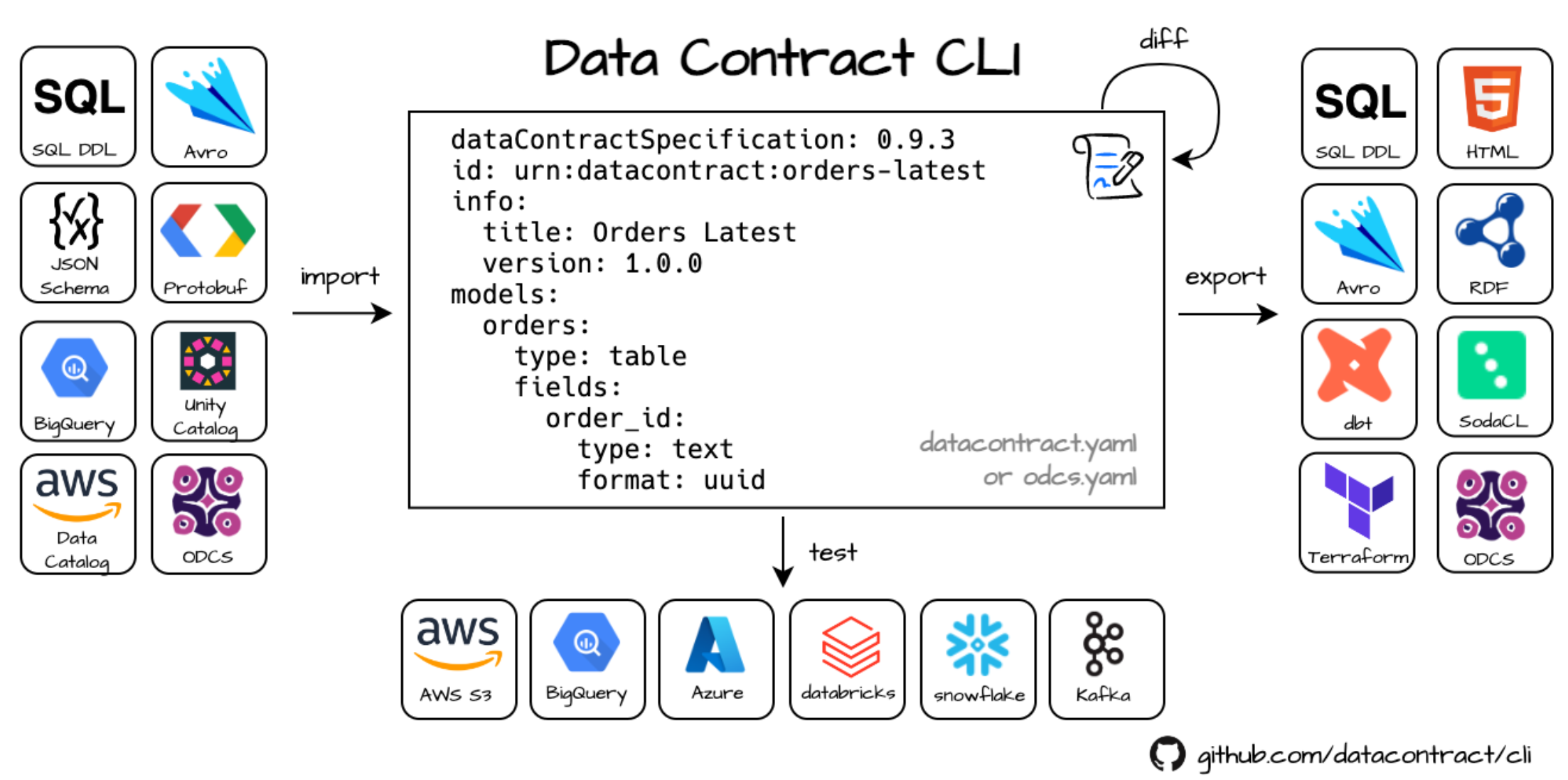
In the Biocloud, we use the Datacontract CLI to create, export, and utilize data contracts programmatically.
This allows us to:
- Automatically create and sync tables across different technology stacks (e.g., Databricks)
- Generate documentation from data contracts
- Translate data quality requirements into actual checks in data quality frameworks (e.g., Soda)
- ... -> many more! The CLI is still in very active development and new connections and features are added very rapidly.
Data Quality Checks
Data quality checks are automated processes that validate and monitor data for completeness, accuracy, and consistency. They run during pipeline stages to catch and correct bad data before it’s used, ensuring the reliability of downstream systems and decisions.
Soda
In the Biocloud, we use the Datacontract CLI to automatically translate data quality requirements from our contracts into SodaCL (the language used by Soda to define quality checks). This allows the Soda engine to execute checks on PySpark DataFrames or Databricks tables.
The Soda Data Quality Framework is a platform designed to monitor, test, and improve data quality across various data stacks. It uses a YAML syntax for defining data quality checks, which is intentionally designed to be business-user friendly for easy understanding and contribution. This approach allows * non-technical users* to actively participate in maintaining and defining data quality standards for their organization. Soda has an open-source data quality stack, which includes the engine to execute these data quality checks. In the Biocloud we use this engine to execute the translated data quality checks from our data contracts on our Pyspark DataFrames to do checks before writing to our Delta tables on new data coming in, as well as executing checks over the whole Delta table after writing to monitor Data Quality over time.
Implementation Architecture
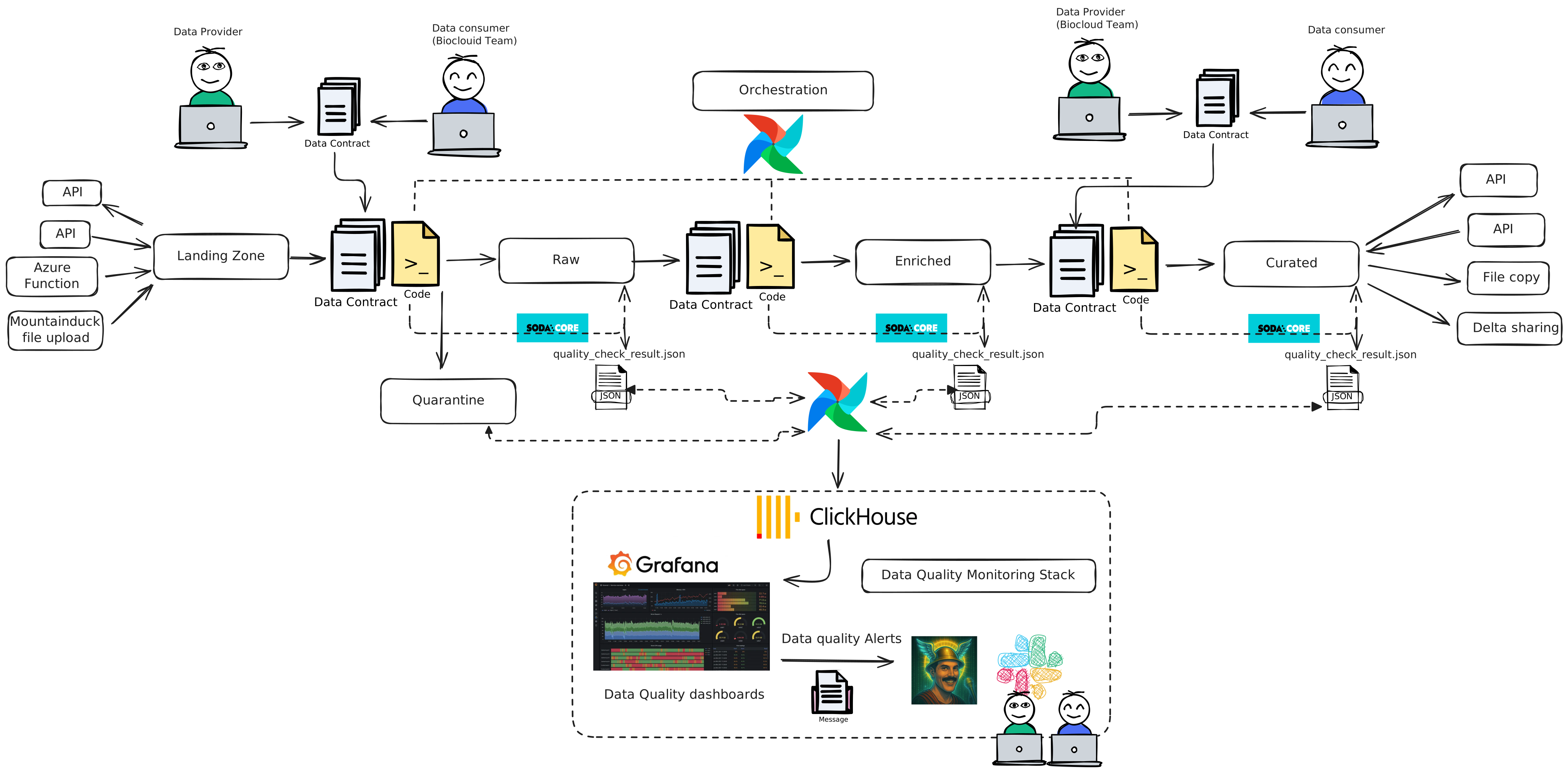
In the above schematic, you can see how data contracts are implemented in our medallion architecture of our data lake.
In our architecture, data contracts are the most important for data coming into the data lake and data leaving the data lake. For those data contracts, it's crucial to work together with data providers/consumers to create a common understanding of the data and define these rules and expectations in the data contract.
In the enriched layer, conceptually a data contract is not really necessary, but it just helps us technically to have a standard way to define schemas and quality checks throughout our data lake. This is because a data contract paired with the data contract CLI gives us powerful tools to automate table creation in many different technologies (think Delta tables in Databricks, Postgres tables, ClickHouse, ...).
By executing data quality checks in every layer with SODA and saving the results via ClickHouse in our monitoring stack, we are able to monitor data quality in the whole data lake by implementing this architecture.
In the next chapter, we will take a closer look at how this is technically implemented and how a typical workflow with data contracts and data quality checks would work.
Technical implementation in the Raw Layer
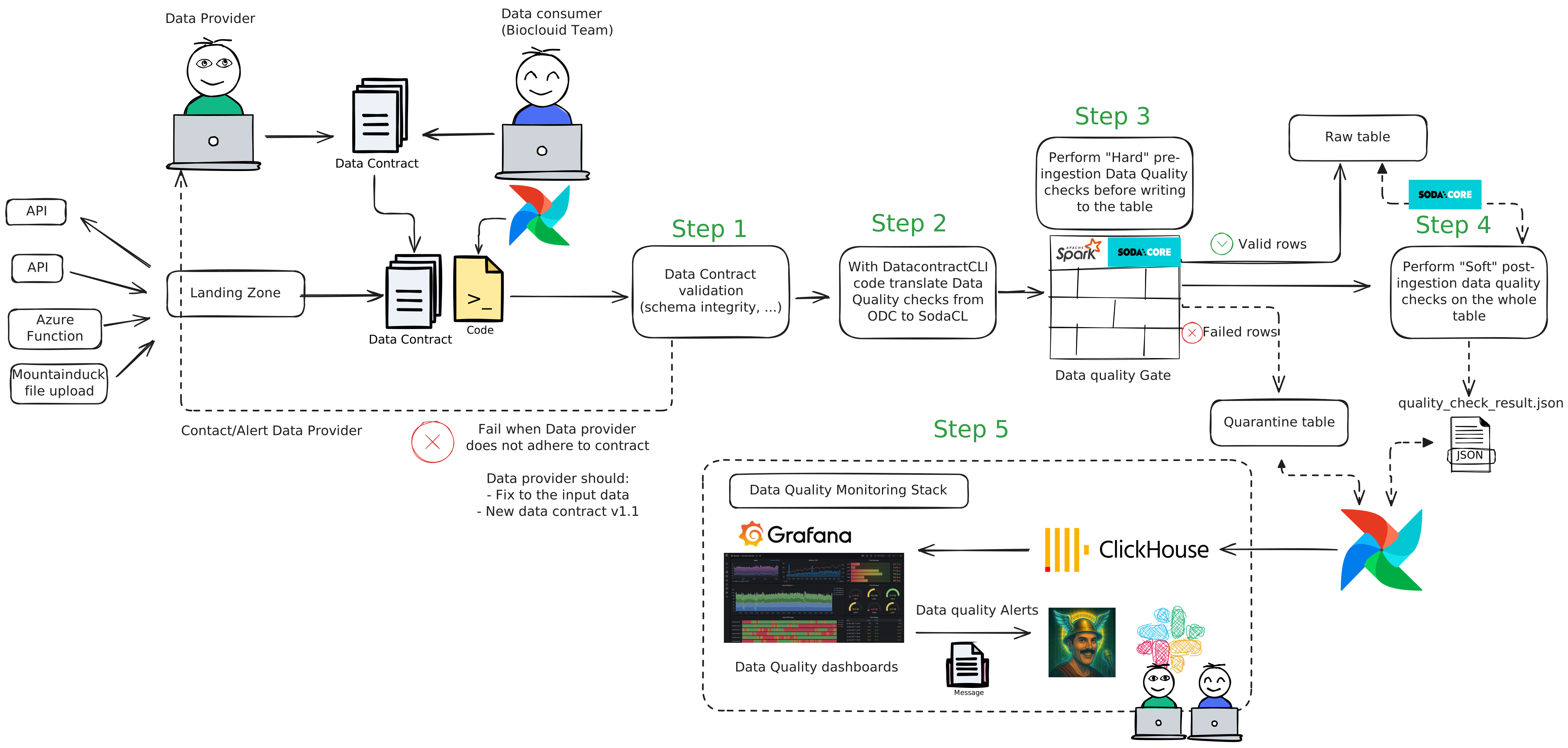 In the above schematic you can see the technical explanation how we implement data quality checks with data contracts
and Soda in the raw layer.
We chose the raw layer as an example as this layer is the most complicated and important layer for preserving data
quality in our Data Lake. As you can see in the architecture in the previous
chapter, in the other layers we also do implement data contracts and quality checks with Soda, but in the raw layer we
implement a full Data Quality gate, to make sure no bad data polutes our data lake.
In the above schematic you can see the technical explanation how we implement data quality checks with data contracts
and Soda in the raw layer.
We chose the raw layer as an example as this layer is the most complicated and important layer for preserving data
quality in our Data Lake. As you can see in the architecture in the previous
chapter, in the other layers we also do implement data contracts and quality checks with Soda, but in the raw layer we
implement a full Data Quality gate, to make sure no bad data polutes our data lake.
What happens in the graph above:
- Just as in our architecture without data contracts, a data provider makes it's data available to us in a certain format (API, file, ...) which we either retrieve or receive on our landing_zone.
- Instead of just accepting the data as is, we have a workshop together with the data provider to create a data contract in which we document and decide on the SLAs, schema, and so on to make sure both parties agree on the incoming data.
- We save the data contract as a yaml file in our codebase, from here we can utilize the datacontract CLI and the code we wrote on top of it to programatically use the datacontract to our advantage.
From this point 5 steps are implemented to with the data contract as input. (For enriched and curated these are 4 steps)
- Step 1 - Data Contract Validation: In this step, we validate the newly ingested data from our landing_zone with the rules agreed upon in the data contract regarding to the schema and data type conventions. If this is not met, our code will not continue the data pipeline and will give a very clear error message which states which rule has been violated. This can then be alerted/communicated (in the future maybe even automated) to the data provider. In order for the data to processed again, the data provider should fix the data he provides to adhere to the contract. If it is an anticipated change, they should provide an updated version of the data contract, which will be reflected by the version (For example v1.0 -> 1.2). This also allows us to track changes over time on the contract. As seen in the chapter above, our code will also handle the updates to the database schema and documentation automatically once provided.
- Step 2 - Translate ODC Data Quality checks to SodaCL: Using the capabilities of the datacontract CLI as well as the code we wrote on top of it, we translate the functional data quality checks written in the contract to SodaCL, a language which the SODA data quality engine can understand and execute on our data. Not all "hard" pre-ingestion data quality checks can always be translated to SODACL directly, that's why we can also add checks as type "text" so that we can still validate and filter bad data with checks written with custom code.
- Step 3 - Data Quality Gate (unique for the raw layer): In this unique step, we guard our data lake from data of the outside world which can possible be dirty and pollute our data lake. We need to keep our lake clean and fresh! To do this we perform our "hard" data quality checks before we ingest any of the new data in our raw table. These are the hard requirements defined in the data contract on the incoming data on row level. Any rows that do not adhere to these "hard" rules, are written into quarantine and not written to our raw table. This prevents these rows from polluting the data lake in further steps of our medallion architecture. These checks can either be ran by the Soda Engine on the incoming dataframe in our code, as well as with custom python checks. This depends on the complexity of the checks and if the datacontractCLI is able to translate the checks into SODACL checks for the Soda Engine. If it is not possible to translate a check to SodaCL the check is written as a type "text" check in the data contract. This is always a technical decision that has to be validated and taken by one of the Data Engineers of the Biocloud team and not by the data provider. This is ofcourse with the guarantee that there should be no conceptual difference between the Soda checks and custom code checks, and all checks independent of their technology should be added in the data contract. Alerting on data in quarantine is handled later in other steps in this process. (A process for getting rows back out of quarantine will be designed in the future). Important note! These "hard" checks are mostly meant for technical issues with data, not adhering to the standards of the data lake. Some specific business logic related checks can be implemented here in very specific cases, but by preference these should be handled later by the "soft" data quality checks post-ingestion, as business logic should be applied in the enriched layer and not in the raw layer.
- Step 4 - Post-ingestion data quality checks on the whole table: From this step the process is again the same for the enriched and curated layer as well. Here the "soft" post-ingestion checks are performed on the full table to which the pipeline has written to (in this example the raw table). In this step we use the translated SodaCL check and run them over the whole table via the SODA engine. A typical example of this is that SODA connects to databricks and performs the checks on the table, but this can also be on tables stored in many other technologies (Postgress, Clickhouse, ...). In this step we do things as anonamly detection, percentage of null values, specific business logic checks as well as the custom SQL query checks defined in the data contract. When the checks are complete, a test result file will be written as JSON to the buckets of our data lake.
- Step 5 - Data quality monitoring stack: In the last step of our data quality process, an Airflow task will write the quarantined data and soda test results to our Clickhouse instance. From this point our Grafana monitoring platform will automatically have fresh and updated data quality data which can then be displayed in the data quality monitoring dashboards for each table. In these dashboards we can monitor data quality over time, display both the quarantine table as well as anonomalies, business logic checks and so on. We can also define alerting rules, to both notify ourselves, data providers and/or data consumers on specific statuses of the data. Because our Freddie Mercurius bot in Slack is connected to our Grafana platform, we can be notified in the same way as we are for Airflow pipelines but then in a custom way for data quality.
Automatic documentation
Under the Data Contract section of our documentation site, you’ll find automatically generated documentation for each data contract in our codebase. This includes:
- Column definitions
- SLAs agreed upon with data consumers/providers
- Other relevant metadata
This documentation is automatically updated by our CI/CD pipelines whenever a new data contract is added to the codebase and placed in the appropriate layer folder (raw, enriched, curated).